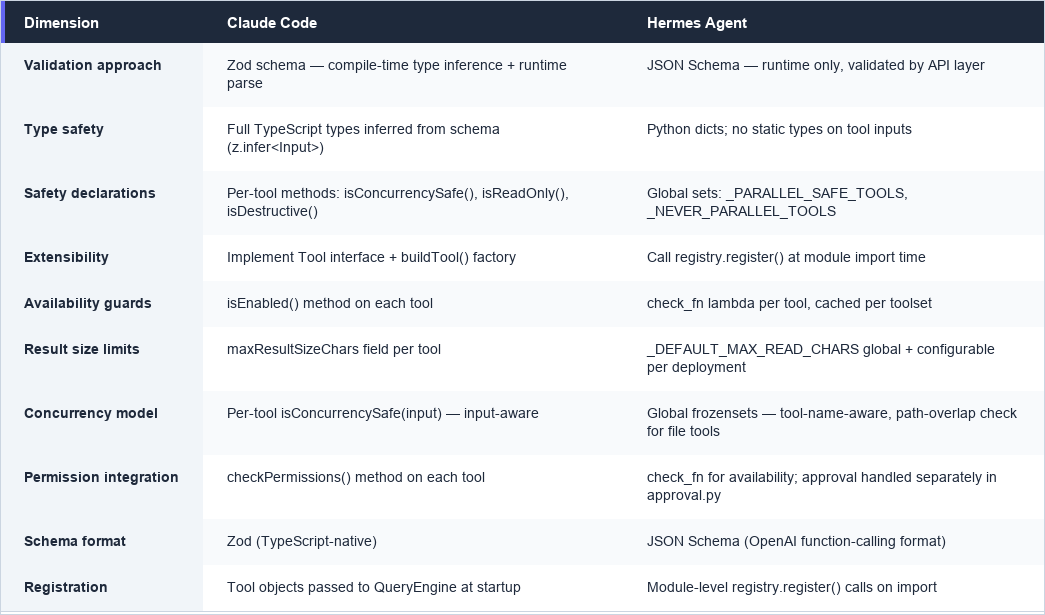
Every action an agent can take must be defined, validated, and declared safe or dangerous before it executes. This is the tool contract — the boundary between model reasoning and real-world consequences. A language model produces text; tools are what turn that text into file writes, network calls, shell commands, and system changes. The contract forces every tool to answer three questions before the harness will run it: Is the input valid? Is the caller permitted? Can this run alongside other tools, or must it run alone? Without this contract, the harness is blind to tool semantics and must treat every invocation as potentially catastrophic. With it, the harness can optimize concurrency, automate approvals for safe operations, and gate destructive actions behind explicit confirmation — all without the model needing to know any of this is happening.
Claude Code defines the tool contract in TypeScript using the Tool
type and the buildTool
factory. The design is opinionated: defaults are conservative, and tool authors must explicitly opt into optimizations.
// src/Tool.ts
// Conservative defaults: every new tool starts as serial, stateful, and non-destructive.
// Tool authors must explicitly override to unlock concurrency or flag destructive behavior.
const TOOL_DEFAULTS = {
isEnabled: () => true,
isConcurrencySafe: (_input?: unknown) => false, // serial by default
isReadOnly: (_input?: unknown) => false, // assume state mutation
isDestructive: (_input?: unknown) => false, // assume reversible
checkPermissions: (
input: { [key: string]: unknown },
_ctx?: ToolUseContext,
): Promise<PermissionResult> =>
Promise.resolve({ behavior: 'allow', updatedInput: input }), // defer to general system
userFacingName: (_input?: unknown) => '',
}
export function buildTool<D extends AnyToolDef>(def: D): BuiltTool<D> {
return {
...TOOL_DEFAULTS,
userFacingName: () => def.name,
...def, // tool-specific overrides win
} as BuiltTool<D>
}
The defaults are deliberately pessimistic. A new tool that forgets to declare isConcurrencySafe: true
will run serially — slower, but safe. A tool that forgets isDestructive: true
will skip the confirmation prompt — a gap, but the permission system still applies. The direction of failure is toward caution.
// src/tools/AgentTool/AgentTool.tsx
// Zod schema serves two purposes simultaneously:
// 1. TypeScript infers the input type at compile time (z.infer<typeof baseInputSchema>)
// 2. The harness validates the JSON payload at runtime before calling the tool
const baseInputSchema = lazySchema(() => z.object({
description: z.string().describe('A short (3-5 word) description of the task'),
prompt: z.string().describe('The task for the agent to perform'),
// Optional fields with explicit types — no implicit any
subagent_type: z.string().optional().describe('The type of specialized agent to use'),
model: z.enum(['sonnet', 'opus', 'haiku']).optional().describe('Optional model override'),
run_in_background: z.boolean().optional().describe('Set to true to run in background'),
}))
lazySchema
defers construction to break circular dependencies between tools that can spawn each other. The .describe()
calls do double duty: they document the field for the model in the system prompt, and they appear in error messages when validation fails.
// src/Tool.ts — the full behavioral surface of a tool
isConcurrencySafe(input: z.infer<Input>): boolean
// True → harness can batch this with other concurrent-safe tools
// False (default) → harness runs this serially
isReadOnly(input: z.infer<Input>): boolean
// True → permission system can auto-approve without user confirmation
// False (default) → requires permission evaluation
isDestructive?(input: z.infer<Input>): boolean
// True → requires explicit user confirmation even in auto-approve modes
// Optional — defaults to false via TOOL_DEFAULTS
These are methods, not static flags, because the answer can depend on the input. A FileWrite
tool writing to /tmp
might be non-destructive; writing to /etc/hosts
is destructive. The harness calls these methods with the validated input before making any execution decision.
// src/tools/AgentTool/AgentTool.tsx
// Tool-specific permission logic runs after the general permission system.
// Here, AgentTool auto-approves in most modes but defers to the classifier in auto mode.
async checkPermissions(input, context): Promise<PermissionResult> {
const appState = context.getAppState()
if (appState.toolPermissionContext.mode === 'auto') {
return {
behavior: 'passthrough', // let the classifier decide
message: 'Agent tool requires permission to spawn sub-agents.'
}
}
return {
behavior: 'allow',
updatedInput: input // can modify input before execution (e.g. normalize paths)
}
}
// src/Tool.ts
/**
* Maximum size in characters for tool result before it gets persisted to disk.
* When exceeded, the result is saved to a file and Claude receives a preview
* with the file path instead of the full content.
*/
maxResultSizeChars: number
Without this limit, a single grep across a large codebase could return enough text to exhaust the context window. The harness truncates at the limit, saves the full output to a temp file, and gives the model a preview plus the path. The model can then use FileRead
to examine specific sections.
Hermes uses a central registry singleton instead of a type system. Tools register themselves at module import time, and the registry handles schema retrieval, availability checking, and dispatch.
# hermes-agent/tools/registry.py
# Tools call this at module level — registration happens on import, not on first use.
# This means the registry is fully populated before any agent loop starts.
registry.register(
name="read_file", # tool name the model uses in tool_use blocks
toolset="file", # logical group (used by toolsets.py for bundling)
schema={ # JSON Schema — runtime validation only, no compile-time types
"name": "read_file",
"description": "Read a file with pagination and line numbers.",
"parameters": {
"type": "object",
"properties": {
"path": {"type": "string", "description": "File path to read"},
"offset": {"type": "integer", "description": "Start line (1-indexed)", "default": 1},
"limit": {"type": "integer", "description": "Max lines to return", "default": 500},
},
"required": ["path"],
},
},
handler=read_file_tool, # callable that executes the tool
check_fn=None, # None = always available; lambda returning bool for conditional tools
requires_env=[], # env vars that must be set for this tool to work
)
The check_fn
is the availability guard. When get_definitions()
builds the tool list for the model, it calls each tool's check_fn
and silently omits tools whose check returns False
. This is how Hermes gates tools on environment conditions — a web search tool might check for an API key, a Home Assistant tool checks for HASS_TOKEN
.
# hermes-agent/tools/registry.py
def get_definitions(self, tool_names: Set[str], quiet: bool = False) -> List[dict]:
"""Return OpenAI-format tool schemas for the requested tool names.
Only tools whose check_fn() returns True (or have no check_fn) are included.
The model never sees tools that aren't available — no confusing error messages.
"""
result = []
check_results: Dict[Callable, bool] = {}
for name in sorted(tool_names):
entry = self._tools.get(name)
if not entry:
continue
if entry.check_fn:
# Cache check results — multiple tools in the same toolset share a check_fn
if entry.check_fn not in check_results:
try:
check_results[entry.check_fn] = bool(entry.check_fn())
except Exception:
check_results[entry.check_fn] = False # fail closed
if not check_results[entry.check_fn]:
continue # silently omit unavailable tools
schema_with_name = {**entry.schema, "name": entry.name}
result.append({"type": "function", "function": schema_with_name})
return result
Unlike Zod, JSON Schema gives you no compile-time guarantees. The model's JSON payload is validated by the LLM API layer (OpenAI/Anthropic format), not by Hermes itself. Hermes trusts that if the model followed the schema description, the handler will receive valid arguments.
# hermes-agent/run_agent.py
# Tools that must NEVER run concurrently — interactive or user-facing tools
# that would produce confusing interleaved output.
_NEVER_PARALLEL_TOOLS = frozenset({"clarify"})
# Read-only tools with no shared mutable session state.
# These are safe to run in parallel because they don't modify anything.
_PARALLEL_SAFE_TOOLS = frozenset({
"ha_get_state",
"ha_list_entities",
"ha_list_services",
"read_file",
"search_files",
"session_search",
"skill_view",
"skills_list",
"vision_analyze",
"web_extract",
"web_search",
})
# File tools can run concurrently only when they target independent paths.
# Two read_file calls on different files are safe; two write_file calls on
# the same file are not.
_PATH_SCOPED_TOOLS = frozenset({"read_file", "write_file", "patch"})
This is a global declaration, not a per-tool property. The _should_parallelize_tool_batch()
function checks these sets at runtime to decide whether a batch of tool calls can run concurrently. If any tool in the batch is in _NEVER_PARALLEL_TOOLS
, the whole batch runs serially. If any tool is not in _PARALLEL_SAFE_TOOLS
(and not in _PATH_SCOPED_TOOLS
), the batch runs serially.
# hermes-agent/tools/file_tools.py
# Character-count guard prevents context explosions from large file reads.
# 100K chars ≈ 25-35K tokens across typical tokenizers — a safe proxy
# when you don't know which model you're talking to.
_DEFAULT_MAX_READ_CHARS = 100_000
def read_file_tool(path: str, offset: int = 1, limit: int = 500, task_id: str = "default") -> str:
# ...
content_len = len(result.content or "")
max_chars = _get_max_read_chars() # configurable via config.yaml
if content_len > max_chars:
total_lines = result_dict.get("total_lines", "unknown")
return json.dumps({
"error": (
f"Read produced {content_len:,} characters which exceeds "
f"the safety limit ({max_chars:,} chars). "
"Use offset and limit to read a smaller section. "
f"The file has {total_lines} lines total."
),
"path": path,
"total_lines": total_lines,
}, ensure_ascii=False)
This is Hermes's equivalent of maxResultSizeChars
— a hard cap on how much content a single tool call can inject into context. The limit is configurable per deployment via config.yaml
, which matters when you're running against models with different context window sizes.