You may ask why Claude Code has so many extensions.
The useful question is not which extension is best. The useful question is what you are trying to change: the context Claude sees, the knowledge it loads, the guarantees it keeps, the systems it reaches, or the engine itself.
One mechanism — mods — runs inside Claude Code as JavaScript, sees each tool call before it runs, and draws in the interface. Everything else works from outside.
The loop and its injection points— I place all fourteen mechanisms on one map of the agent loop, so the choice becomes positional, not preferential.Always-on context: CLAUDE.md, rules, output styles— The docs state the limit plainly: keep CLAUDE.md under 200 lines, and neither CLAUDE.md nor an output style is enforced.On-demand knowledge: skills and subagents— A skill's description loads every session while its body loads on use, so reference material costs nothing until needed.Enforcement: hooks— A hook fires on its event without Claude deciding. A skill's outcome can vary because Claude interprets the instructions. Guardrails belong in hooks.The outside world: MCP servers, plugins, marketplaces— A plugin is packaging; an MCP server is a wire to an external system. A marketplace is a catalog, not a store.Inside the engine: mods— The only mechanism that observes, rewrites, or answers a tool call in-process, registers commands that cost no Claude turn, and draws UI. On by default since v2.1.287.The decision map— One table turns your trigger into the mechanism: repeated mistake, repeated prompt, flooded context, must-happen-every-time, outside data, shared setup, or in-loop control.
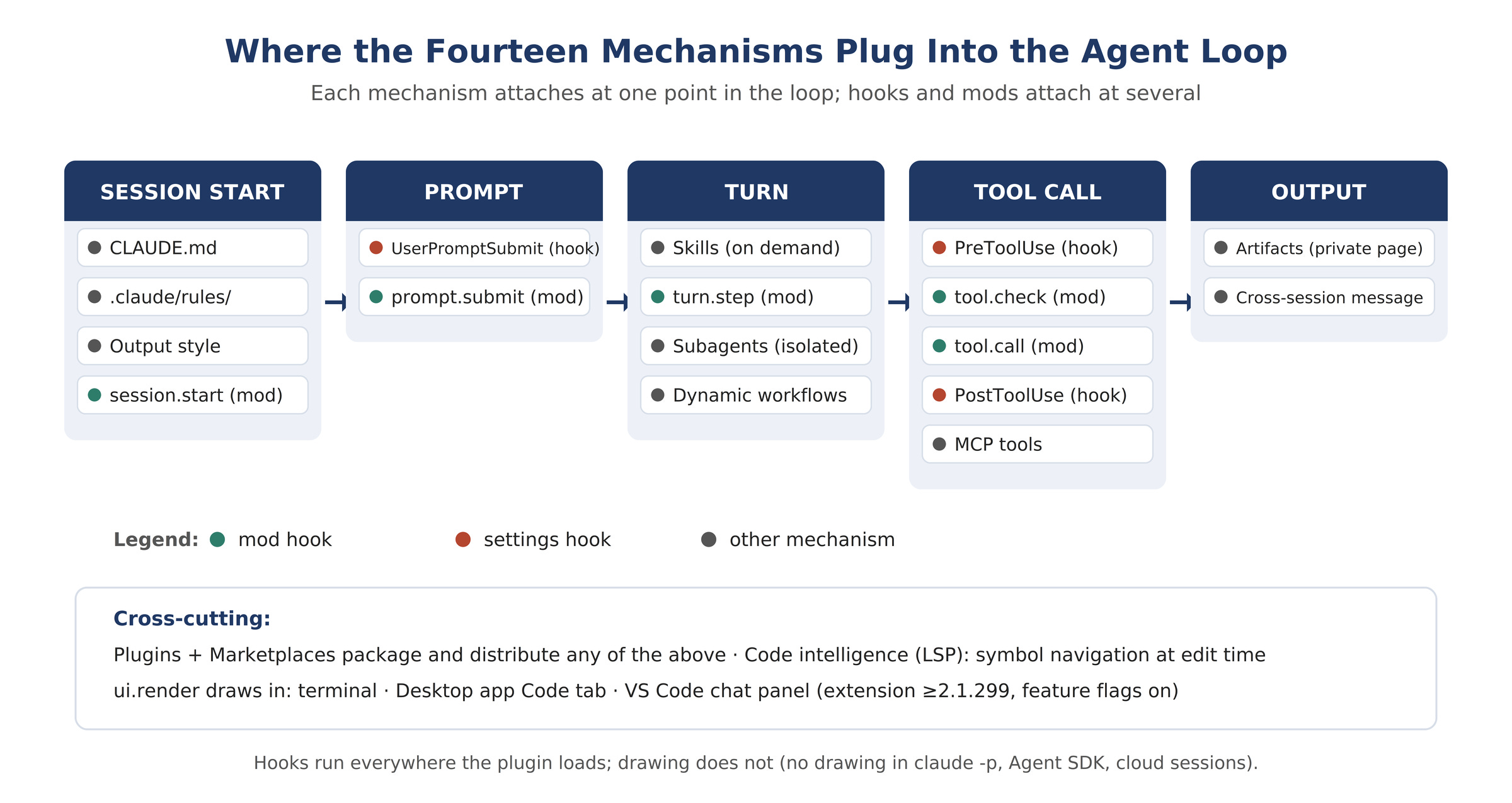
Claude Code's own docs frame extensions the way I now think about them: "Extensions plug into different parts of the agentic loop." I counted fourteen distinct mechanisms across the docs, including path-scoped rules and mods. Each one attaches at a different point: session start, prompt submission, the turn, the tool call, the outside system, or the interface surface.
Figure 1 shows the loop with every injection point marked. I built it so the selection logic reads off positions.
Figure 1: The agent loop with each extension mechanism at its injection point. Session start loads CLAUDE.md, path-scoped rules, and the output style. Prompt submission passes settings hooks and mod hooks. Each tool call passes PreToolUse, the mod permission check, and the mod call hook. MCP servers attach tools; subagents run isolated loops; artifacts carry output out.
I group the fourteen into five jobs. Always-on context tells Claude what is true every session. On-demand knowledge loads when relevant. Enforcement makes something happen every time. Outside connections reach systems Claude Code does not own. Mods operate inside the engine itself. The rest of this article walks the five jobs in that order, then gives you the decision table.
CLAUDE.md loads every session. The docs describe it as persistent context for project conventions and "always do X" rules: build commands, test conventions, project structure, never-do-X rules. The docs also give the capacity rule I now enforce on my own files: keep CLAUDE.md under 200 lines. When it grows past that, the docs say to move reference content into skills or split it into .claude/rules/
files.
Rules are CLAUDE.md split into files with optional path scoping. A rule file carries paths
frontmatter, and Claude Code loads it when Claude works with matching files. I use rules for language- or directory-specific guidance: the frontend directory gets its component conventions, the API directory gets its handler conventions, and neither costs sessions that never touch those paths.
Output styles set Claude's role, tone, and response format for every response in a session. One style is active at a time, and you can switch mid-session. CLAUDE.md stays loaded whichever style you pick. The two combine as instructions.
Here is the sentence from the docs that reordered my own setup: "Claude follows both as instructions, so neither is enforced. For anything that has to happen every time, use a hook." I had treated CLAUDE.md as policy. It is a request. The docs say this explicitly, and once I accepted it I moved every must-happen rule I actually cared about into hooks.
Skills are the mechanism I see misused most. A skill is a SKILL.md
file of instructions Claude loads on demand. The cost structure matters more than the format: the skill's description loads each session, and the full body loads only when Claude invokes it or you type /name
. Long reference material costs almost nothing until used. That is the economic argument for moving bulk out of CLAUDE.md and into skills.
Claude Code skills follow the Agent Skills open standard, with Claude Code extensions for invocation control, subagent execution, and dynamic context injection. Two frontmatter fields control the invocation economics. disable-model-invocation: true
stops Claude from running the skill on its own. I set this on anything with side effects. The bundled /verify
skill works this way: it runs only when invoked, which keeps the user in control of when longer-running checks spend time and tokens.
---
name: deploy
description: Deploy the service to staging using our checklist
disable-model-invocation: true
---
1. Run `pnpm build` and stop on failure.
2. Run `./scripts/deploy.sh staging`.
3. Post the deploy URL in the summary.
Skills can also carry hooks in their frontmatter. Those hooks apply for the rest of the session after the skill runs. A skill can run in isolated context with context: fork
, and a subagent can preload specific skills. The mechanisms compose.
Subagents are isolated workers with their own context that return a summary. Custom subagents live in .claude/agents/
as Markdown with frontmatter: description
(the trigger Claude reads to decide invocation), tools
(least-privilege constraint), model
, and permissionMode
. I wrote about the orchestration layer — subagents, dynamic workflows, and agent teams — in detail here, so I will not redo it. The one-line version: a subagent keeps a noisy task out of your main context, a dynamic workflow is a script Claude writes that fans work across many subagents, and agent teams coordinate multiple sessions through a shared git workspace.
The docs give the comparison that decides between skills and hooks, and I quote it because the wording is exact: a hook "fires on its event without Claude deciding," while for a skill "Claude interprets the instructions; outcome can vary." A skill is probabilistic. A hook is deterministic. When I need a guarantee, I now reach past the skill.
One instrument worth knowing: the bundled /doctor
skill audits your setup and reports unused skills, MCP servers, and plugins against their context cost, plus slow hooks. I run it when my session feels heavy. It names what each extension costs.
Hooks are shell commands, HTTP endpoints, MCP tool calls, LLM prompts, or subagents that run automatically at lifecycle points. The hooks reference lists the events: SessionStart
, UserPromptSubmit
, PreToolUse
(can block), PermissionRequest
, PostToolUse
, Stop
, SubagentStart
, PreCompact
, FileChanged
, SessionEnd
, and more. The docs' own guidance is blunt: "Put guardrails in hooks. An instruction like 'never edit .env
' in CLAUDE.md" is a request, not a control.
Figure 2 places the four instruction mechanisms on one spectrum, from request to in-process interception.
Figure 2: The enforcement spectrum. CLAUDE.md, rules, and output styles are requests Claude interprets. Skills are suggestions Claude may or may not invoke. Hooks fire deterministically on lifecycle events. Mods intercept events inside the process before Claude Code acts.
A hook definition has three levels: the event, a matcher that filters when it fires, and the handler. Matchers take exact tool names (Bash
), lists (Edit|Write
), or JavaScript regular expressions for anything else. This example blocks destructive shell commands:
{
"hooks": {
"PreToolUse": [
{
"matcher": "Bash",
"hooks": [{ "type": "command", "command": ".claude/hooks/block-rm.sh", "onFailure": "block" }]
}
]
}
}
The script reads the tool-call JSON from stdin, checks the command, and returns a permissionDecision
of deny
when it matches rm -rf
. Claude Code passes the event context on stdin and reads the decision from the script's output.
Where you define the hook sets its scope and shareability. ~/.claude/settings.json
covers all your projects and stays on your machine. .claude/settings.json
covers one project and commits to the repo. Plugin hooks/hooks.json
ships with the plugin. Skill frontmatter hooks last for the session once the skill runs; subagent frontmatter hooks last while that subagent runs. Hook entries merge across settings levels instead of replacing each other, and hooks fire inside subagents too, with the input carrying the subagent's identity.
The context cost of a hook is zero unless the hook returns output. That is the number that sold me on hooks for logging and notifications: a SessionStart
hook that records the session, a Stop
hook that posts to Slack, a PostToolUse
hook that lints. They cost nothing when silent and fire every time without Claude's judgment.
MCP servers connect Claude to external services and data. The docs draw the line I now use to stop conflating two mechanisms: "MCP gives Claude purpose-built tools for an external system, with the connection and authentication handled by the server. Skills give Claude knowledge about how to use those tools effectively." An MCP server without a skill gives Claude a tool it uses badly. A skill without the MCP server gives Claude knowledge it cannot act on. I now write them as pairs: the server for access, the skill for the schema, the query patterns, and the team conventions.
claude mcp add postgres -- npx -y @modelcontextprotocol/server-postgres "postgresql://localhost/app"
MCP tool search is on by default, so idle tools cost little. Heavy servers still add up, which is why /doctor
reports each server against its context cost.
Plugins are the packaging layer. A plugin is a directory of skills, agents, hooks, MCP servers, and mod code that installs and loads as one unit. The manifest at .claude-plugin/plugin.json
names it. Plugin skills are namespaced — /my-plugin:review
— so multiple plugins coexist. The plugins overview documents the footprint an enabled plugin carries into every session: each skill, agent, and command Claude can invoke on its own contributes its name and description to context on every turn, the plugin's MCP servers run alongside each session, and its hooks fire at their events. A plugin you install but never use still costs context on every turn. I audit mine quarterly.
my-plugin/
.claude-plugin/plugin.json
skills/review/SKILL.md
agents/reviewer.md
hooks/hooks.json
.mcp.json
Install scopes decide who gets the plugin: user scope (every project on the machine), project scope (everyone in the repo, through committed settings), or local scope (this repo, only you). During development you skip distribution entirely and load the directory with --plugin-dir
.
Marketplaces are catalogs, not stores. A marketplace is a repository or directory with a .claude-plugin/marketplace.json
file that lists plugins and where to fetch each one. You add the marketplace once, then install by name: claude plugin install token-chart@your-org
, or /plugin install token-chart@your-org
inside a session. Anthropic's official marketplace is added automatically on first interactive terminal session. Note the naming trap the docs call out: the website at claude.com/marketplace is a browseable directory, not a marketplace you add with /plugin marketplace add
.
A mod is a plugin whose code registers event handlers that Claude Code calls in its own process. That one sentence from the mods overview is the whole distinction. Settings hooks, skills, status lines, and MCP servers work from outside Claude Code: each runs a script, or gives Claude text or tools. A mod runs inside, so it can do what the others cannot: draw interface, redraw Claude Code's own interface, step into a tool call or a request, and run your code on a command with no Claude turn.