Microsoft has no single place that answers one question for every agent tool call: which tool, with which arguments, may this agent call right now. Article 1 gives the full MAESTRO detail, and this article uses that map and does not repeat it. Article 1 is about AWS Agentic Security Tooling. This is the 2nd in this series.
A team that migrates the AWS gateway model to Microsoft must stop looking for the Microsoft gateway, and must build the equivalent from four controls that never see every call together.
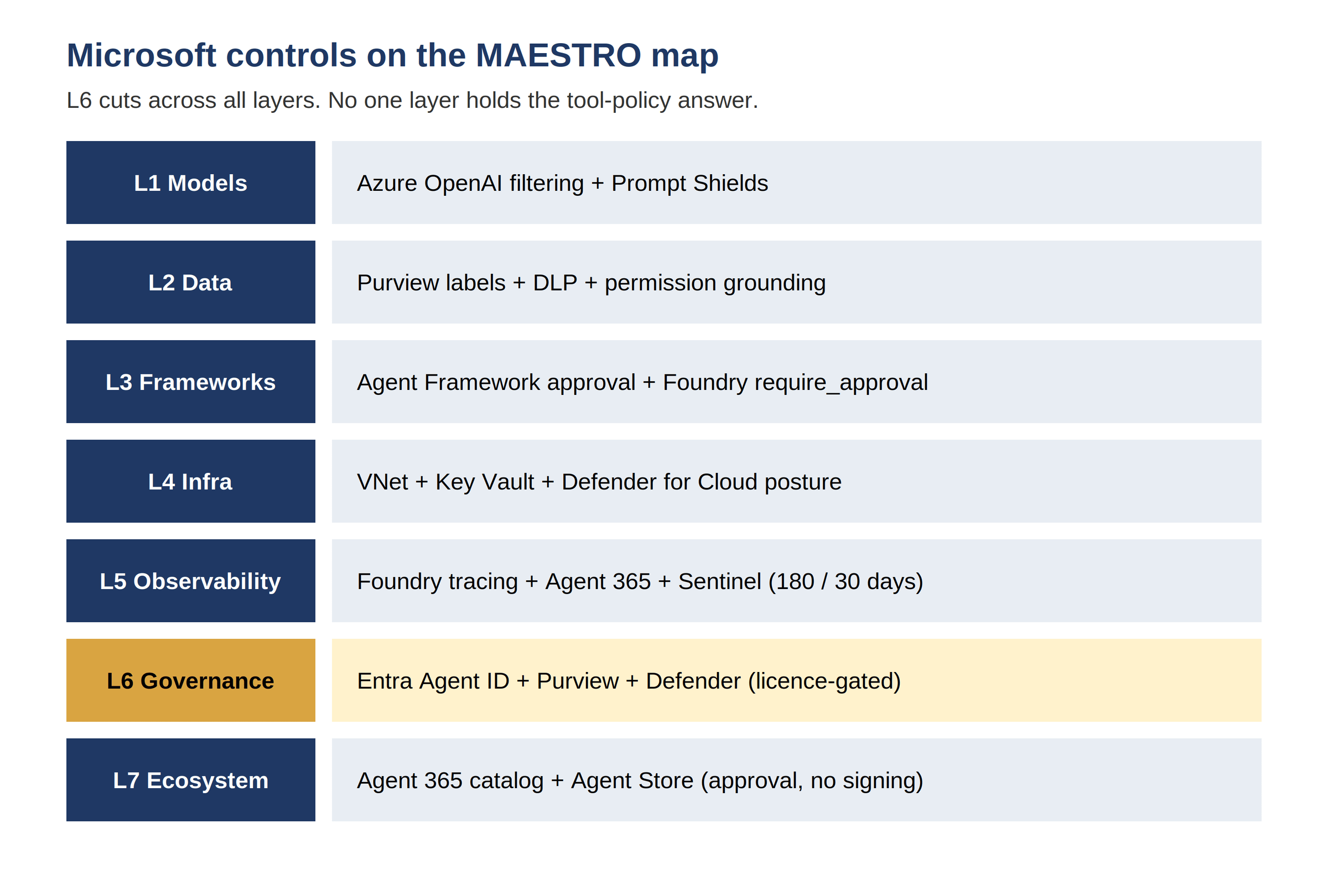
Figure 1 is the Microsoft stack on the MAESTRO map: identity, content safety, and framework controls sit on different layers, and no single layer has the tool-policy answer.
Figure 1: Microsoft controls map to MAESTRO layers, with L6 cutting across all layers. Policy is split across four places, and no one place sees every tool call.
L1 Foundation Models — the stake is model output. A model can follow a harmful instruction with fluent, confident text. Output alone never proves safety. The paid L1 section states what Azure OpenAI filtering scores, what Prompt Shields blocks only when configured to block, and what stays with the customer.
L2 Data Operations — the stake is retrieved text. A document, a memory record, or a tool result can carry an instruction. Retrieval puts untrusted text into model context. The paid L2 section states what Purview governs, what groundedness scores, and what no Microsoft control validates.
L3 Agent Frameworks — the stake is tool action. A plan becomes real impact only when a tool runs. Tool permission decides that impact. The paid L3 section states where Entra Agent ID, Foundry approval, Agent Framework middleware, and connector controls each stop, and where argument policy remains code.
L4 Deployment and Infrastructure — the stake is runtime privilege. An agent process runs with credentials. Those credentials decide lateral movement. The paid L4 section states how private networking, Key Vault with managed identity, Defender for Cloud posture, and sandboxed code execution fit together.
L5 Evaluation and Observability — the stake is proof. Traces, logs, and evaluations show what an agent did and why. Missing logs remove that proof. The paid L5 section states which audit defaults run 180 days, which hunting window runs 30 days, and which retention and immutability settings need explicit configuration.
L6 Security and Compliance — the stake is identity separation. User identity, agent identity, and tool identity must stay distinct. One shared role leaves unclear who acted. The paid L6 section states the four identity patterns, the licence gate on Conditional Access for agents, and the governance process that must sit around each pattern.
L7 Agent Ecosystem — the stake is peer trust. A peer agent or a tool server needs vetting, registration, and scoped credentials. Registration alone never proves trust. The paid L7 section states what Agent 365 and the org catalog do, what they do not do, and where peer trust remains unbuilt.
Five cross-layer attack chains — the stake is the chain, not one step. Each chain shows the step where a Microsoft control stops it, and the step where a gap lets it pass. The paid chain section gives a test for each chain in a reader's own environment.
Control gaps, reference architecture, and builder playbook — the stake is reuse. The paid closing sections name each gap plainly, split enforcement into identity, content, connector, and framework, and give a copy-ready approval and identity pattern teams can apply on day one.
Start a review with identity. List every agent, and list the identity pattern for each tool that agent can call. Mark each tool as agent-only, on-behalf-of, agent user account, or legacy shared identity. Check whether downstream logs show the user, the agent, or only a shared role. Check whether each agent has a sponsor, and whether each access package has an expiry date. Check whether Conditional Access applies to the agent identity, or whether the licence gate leaves that agent outside Conditional Access. An identity review that finds one shared service principal has found a real finding, not a paperwork issue. An identity review that finds maker credentials on a tool that acts for many users has found a privilege problem that no content filter can fix. An identity review that finds an agent user account with standing user privileges has found a lateral movement path that follows the user, not only the agent.
Continue a review with routing and configuration. List every tool the agent can call, and mark each tool as Foundry-routed, Copilot Studio-routed, Agent Framework-hosted, or direct API. Mark each Prompt Shields setting as Annotate and block, Annotate only, or absent, for each agent. Mark each sensitive tool as approval-required or not approval-required. Mark each MCP server as whole-server blocked, subset-limited, or unrestricted, and mark each connector as per-tool governed or not governed. Mark each audit store with its retention setting, and mark immutability as configured or not configured. A review that skips that inventory cannot judge coverage. A review that completes that inventory can identify the gaps before it reads any policy text. A review that finds an unwrapped sensitive tool has found a missing deterministic break. A review that finds a direct API path has found a bypass for every routed control.
Finish a review with a chain test. Pick one chain from the paid section. Run the chain in a test environment with test data, test documents, and test tools. Record the step where a control stopped the chain. Record the step where no control ran. Record whether approval stopped the destructive tool, whether middleware stopped the argument, whether connector blocking stopped the destination, and whether the tool arguments appeared in the hunting dataset. A chain test gives a team evidence, not an opinion. A chain test also gives a team a repeatable check for the next release. A team that runs chain tests on each release will catch a new tool, a new connector, and a new identity pattern before production does. A team that relies on product names will miss each of those changes until an incident reveals them first.
The paid section maps each layer in turn. The paid section gives the five attack chains, the control gaps, the four-plane reference architecture, and the builder playbook. The paid section links every claim to a primary source. The paid section drops any claim we could not source. The paid section also names each preview limit that affects a production decision. A reader must not place a preview control on a critical path without knowing the limit. The paid section also states, plainly, where Microsoft offers no native control at all. Those gaps are not a criticism of one product. Those gaps are the work a team must plan, fund, and own. A team that plans that work early ships a safer agent. A team that discovers that work after launch causes a delay.
Azure OpenAI Service hosts the model, and Azure AI Content Safety screens the text around it. Content Safety exposes text moderation by severity, Prompt Shields, protected-material detection for text and code, and groundedness detection. Prompt Shields is a unified check for jailbreak attacks on user prompts and for indirect attacks in documents, also called cross-prompt injection. The Prompt Shields guide states the scope and the Preview limits for tool-response screening. Azure OpenAI DefaultV2, the filter policy new deployments inherit, includes jailbreak Prompt Shields and protected-material detection. The content filter configurability guide states what DefaultV2 contains and what a team can change.
Enforcement is configurable, not automatic. Prompt Shields can run in Annotate only mode or in Annotate and block mode, per prompt or completion, per category, and per threshold. A team chooses Low, Medium, or High, and a team can set No filters or Annotate only with approval. Spotlighting, which re-encodes document content to separate data from instructions, is an opt-in toggle with a token cost. Document-attack coverage at tool response for Foundry Agent Service agents is Preview. For model API calls, document-attack coverage applies at user input. An agent that bypasses the guardrail gets no coverage by default. A reader must check the configuration for each agent, not the product name.
Groundedness detection scores whether an answer is supported by the sources a team supplies, sentence by sentence. Groundedness does not verify that a source is authentic, current, unpoisoned, or authorised. Citations trace which chunk an answer cited. Citations do not judge whether that chunk should be trusted. A team that treats groundedness as a detection score will use it to find unsupported answers, and will use approval and identity controls to stop harmful ones.
Purview governs Microsoft 365 and Foundry interactions with classification, sensitivity labels, data loss prevention, and Insider Risk Management. The Purview for AI agents guide states the coverage table plainly. Copilot Studio and Foundry specifically include data classification, sensitivity labels, data loss prevention, and Insider Risk Management. Other agent types are classification-only in that table. Data loss prevention for Copilot can block processing or surfacing of labelled content and sensitive-information-type content in prompts and grounding. Sensitivity labels carry encryption and usage rights that Copilot respects.
Permission-based grounding is a real control with a clear limit. Copilot grounds on data the user can see. Permission-based grounding stops oversharing to a user who lacks access. Permission-based grounding does not stop a permitted but malicious document. Purview does not validate a retrieval corpus, detect poisoned embeddings, or sign retrieved chunks. Corpus integrity is customer-built work: ingestion allowlisting, access control lists on SharePoint and search indexes, index freshness and deletion handling, and pre-index scanning.
Memory has the same gap, more severely. Foundry memory search is Preview. No Microsoft document found in the research claims memory-write validation, memory provenance, or poisoning detection. Prompt Shields screens a prompt or a document at inference time. Prompt Shields does not screen the memory store write path. A poisoned memory record can influence a later turn without ever passing a guardrail at write time. A team must own write-path validation, record ownership, and expiry for memory.
L3 is the centre of this article, because L3 is where Microsoft differs most from AWS Article 1. AWS centralises tool policy outside the model loop at a gateway with a deterministic language. Microsoft has no equivalent product. No Microsoft product deterministically evaluates a policy over agent identity, tool name, arguments, and resource outside the model loop for every agent regardless of host. Policy is split across four places. Entra identity decides who the agent is and what the identity can reach. Content Safety decides what text the model receives and returns. Connector data loss prevention and access control decide which connectors an agent may use. Framework middleware and approval decide what code runs before a tool call. None of those four places monitors every call. A reader who builds the equivalent must wire four controls together and accept that argument-level policy remains code.
Entra Agent ID gives an agent its own identity. The constructs matter, because each construct changes the audit record. An Agent Identity Blueprint is a template for credentials, including federated credentials, certificates, and secrets. An Agent Identity is a special service principal with no credentials of its own, an own object ID, and a mandatory sponsor. The blueprint impersonates the identity. An Agent User Account is an optional one-to-one user account designated for agent use, for systems that accept only user accounts. Tokens come in two forms. Own-authority tokens carry the agent as subject. On-behalf-of tokens carry the user as subject and the agent as actor. The Entra Agent ID identities guide states the constructs and the licensing block. Entra Agent ID reached general availability in spring 2026, after preview at Build in May 2025.
The licence gate changes Conditional Access coverage. Agent ID itself is available to all Entra customers. Extending Conditional Access, Identity Protection, Identity Governance, and network controls to agents requires Agent 365 plus Microsoft 365 E7, or E5 plus Agent 365, or standalone P1 or P2 plus Agent 365. A bare Entra tenant does not get Conditional Access for agents. A team that writes "Conditional Access applies to agents" without the licence condition is wrong for that tenant. A team that budgets Agent 365 gets a real control: per-agent identity with a sponsor, access packages with expiry, and risk-based controls that can block a compromised agent identity.
Legacy identity patterns still exist, and a review must name them. A shared service principal leaves unclear which agent acted. Maker-authenticated Copilot Studio tools run under the maker credentials, not the end user credentials. App-only Graph access runs with standing application permissions. Each legacy pattern widens blast radius. Each legacy pattern weakens attribution. A review that finds a shared service principal or maker credentials on a multi-user tool has found a privilege problem that no content filter can fix.
Foundry MCP tool governance is opt-in per tool. A Foundry MCP tool carries a require_approval setting, including always. Approval submits through the previous response ID with an approve flag. The platform tool-execution layer handles the approval gate, auth injection through the project connection, and retry. Catalog MCP servers let makers pick a subset of tools. The Foundry MCP tools guide states the approval mechanism and the catalog model. Copilot Studio MCP governance differs in granularity. MCP servers share Power Platform connector infrastructure, but per-tool data loss prevention and access control exist for connector tools only. Only whole-server blocking exists for MCP tools. The MCP servers and Power Platform connectors comparison states that granularity gap. The HTTP-request node and any arbitrary endpoint remain an egress bypass. A team must block the HTTP connector or endpoint-filter it.
Human approval is framework-level and opt-in per tool. Agent Framework provides approval-required function wrappers and middleware that intercepts a call and waits. AG-UI carries the approval request to a frontend, so a human sees the tool and the actual arguments, not the model explanation. Foundry MCP require_approval does the same for Foundry tools. No default-deny approval exists. A developer must wrap or mark each sensitive tool. The Agent Framework tool approval guide states the wrapper and middleware pattern. A team must inventory every tool, mark each sensitive tool, and test that an unwrapped tool cannot reach a destructive action by accident or by prompt injection.
Microsoft Agent Framework 1.0 reached general availability on 3 April 2026, after public preview in October…